English
Quick Start
Prerequisites
- Device must have Root access
- LSPosed framework installed with API version >= 101
- System running HyperOS 3/4
- HyperCeiler installed
Resources & Discussion
- Telegram: https://t.me/HyperIsland_Module
Step 1: Install the Module
- Go to Resource Downloads for the latest APK
- Install the APK on your device
Step 2: Activate the Module in LSPosed
- Open LSPosed Manager, go to the "Modules" list
- Find HyperIsland and enable it
- In the module scope, check the recommended apps:
- Download Manager Extension: check "Download Manager"
- Super Island: check "System UI"
- Focus Notification Crack: check "Xiaomi Services Framework"
- Save and tap the restart button in the top-right corner (or restart your phone)

Step 3: Enable Focus Notification Bypass in HyperCeiler
💡 Super Island style notifications require HyperCeiler's "Focus Notification" bypass to display correctly. If your HyperCeiler version is too old, you may not find the corresponding options — please update to the latest version.
- Open HyperCeiler, go to "System UI" or "Xiaomi Services Framework" settings
- Find "Remove Focus Notification Whitelist" and "Unlock Focus Notification Whitelist Verification"
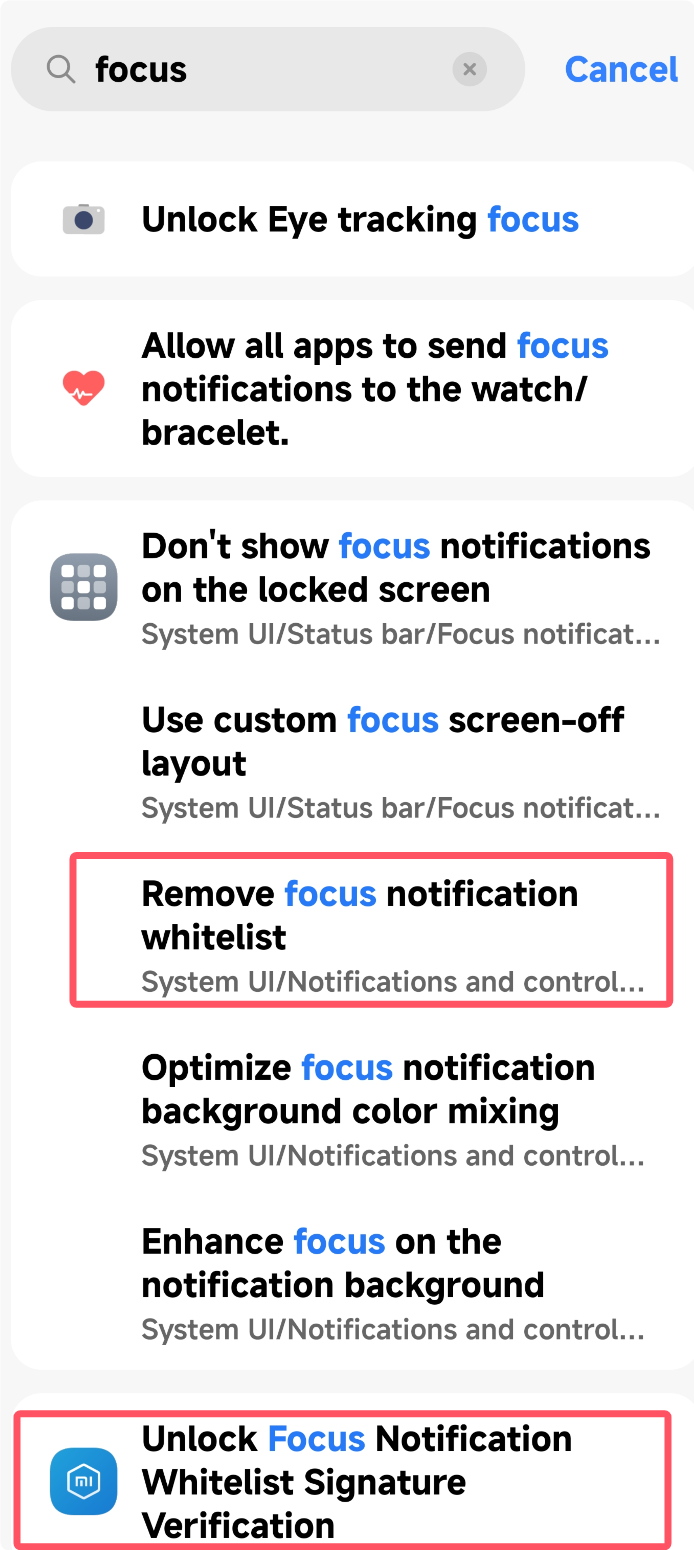
- Enable and restart the scope
Built-in Bypass
The app includes a built-in whitelist bypass, but it doesn't support safe mode and may cause System UI to crash infinitely. Make sure you can recover your device before enabling.
Step 4: Configure the Module
App Adaptation
Open the HyperIsland app and enable the switches for the apps you need. It's not recommended to enable all.
Download Island Note
Download Island is disabled by default. Go to the app and enable "Show System Apps", then check "Download Manager".
- Notification Super Island: Convert any notification to Focus Notification + Super Island display
- Download: Auto-detect download status and convert to Focus Notification + Super Island
- AI Notification Super Island: AI simplifies left and right sides of the Super Island
AI Summary Configuration
AI Summary only supports non-thinking models. Please do not use thinking models.
The URL must be fully filled in. Do not omit /chat/completions.
If the summary fails, it will automatically fall back to a regular notification. If it does not work, please check your configuration.
If the error persists, please check whether your account balance is sufficient.
DeepSeek Configuration
- Model: deepseek-v4-flash
- API: https://api.deepseek.com/v1/chat/completions
- Thinking disable field: thinking
- Thinking disable value: {"type":"disabled"}
Alibaba Cloud Bailian Configuration
- Model: qwen-flash
- API: https://dashscope.aliyuncs.com/compatible-mode/v1/chat/completions
- Thinking disable field: enable_thinking
- Thinking disable value: false
FAQ
For installation, display, and configuration questions, see the standalone page.